
Matching algorithm
The matching algorithm is responsible for finding a suitable vehicle planning for a ride request.
Initial matching is not just a short linear pipeline. ioki Platform first prepares the request, then processes one or more matching rounds, and finally applies additional filters before persisting the result.
- Pipeline at a glance
- Before the matching rounds
- Task List Finder
- Planning List Builder
- Optional reverse geocoding
- Pre-routing validation
- Walking durations
- Time Frame Builder - First run
- Estimation scoring and triage
- Time Frame Builder - Second run
- Final validation and passenger-facing times
- Decider
- Final ranking and pedestrian route generation
- Post-matching filters
- Persister
The matching algorithm can be fine-tuned in the product settings. For the settings that affect the current implementation, see Matching parameters, Matching configurations, and Planning model overrides adapter.
Pipeline at a glance
At a high level, initial matching runs in this order:
- Preparation—ensure direct routing exists, compose ride variants, load the vehicle plannings and world state, and optionally post-process the planning models.
- Task List Finder—select the eligible vehicle plannings and keep the closest ones.
- Planning List Builder—generate candidate pickup and dropoff insertions (and time-shifted variants), sorted and batched into matching rounds.
- Pre-routing validation—drop candidates that are structurally impossible before any routing runs.
- Low-quality routing pass—estimate driving and walking durations quickly, score in estimation mode, and triage the field down to the most promising candidates.
- High-quality routing pass—re-route the survivors precisely, run final validation, and set the passenger-facing negotiation and communicated times.
- Decider—sort by score, drop inferior duplicates per vehicle and ride variant, prioritize the best matching rank, and keep a limited, fleet-diverse set of survivors.
- Post-matching filters and persistence—apply the overlapping-ride, prohibit-parallel-rides, and similar-solution filters, then persist the surviving solutions and the matching logs.
The rest of this page describes each step in detail.
Before the matching rounds
Before the first matching round starts, ioki Platform prepares the request and loads the required world state.
This includes:
- ensuring direct routing is available for the ride
- composing the request into one or more ride variants
- preparing feeder or public-transport alternatives when the product uses them
- collecting recently rejected vehicles
- loading the relevant vehicle plannings and related data
If the product uses a Planning model overrides adapter, ioki Platform also post-processes the internal planning models at this stage before scoring begins. This allows custom adjustments to be applied early in the matching flow, such as adapting scoring inputs or other planning attributes for specific business rules.
The round-based matching flow then runs on that prepared state.
Task List Finder
The Task List Finder loads active vehicle plannings in the relevant time horizon for the request. This horizon is derived from the ride request and the configured matching time deviation.
It then performs an initial suitability check. For example, it checks whether a vehicle planning can be used for ad hoc or prebooked requests, whether concurrent negotiations are allowed, and whether lead-time rules allow the request on that vehicle planning.
Some additional checks apply only in ad hoc or near-term negotiation scenarios:
- If a negotiation for the same vehicle planning is already ongoing, the Concurrent negotiations per vehicle product setting decides whether it can still be considered. A negotiation is ongoing when the vehicle planning already has a matched offer that a passenger has not yet accepted or declined. When the setting is off, that vehicle planning is skipped, so the same vehicle is not offered to two passengers at the same time. When it is on, the vehicle planning can take part in more than one negotiation at once.
- Vehicle plannings can be excluded when the corresponding driver canceled recently.
- For ad hoc requests, vehicle plannings can also be excluded when a non-autonomous vehicle has no connected driver or when the vehicle position is required but missing.
The remaining vehicle plannings are sorted by the distance between their assumed position and the origin of the request. ioki Platform then keeps only the configured number of considered vehicles. This number can be set in Matching parameters.
If no eligible vehicle planning is found at this stage, the core matching flow cannot continue.
Why am I getting “No vehicle available” when trying to book a ride?
If you’re seeing a Cancellation Reason: No vehicle available, here’s a checklist to help troubleshoot the issue:
Vehicle planning
- Ensure that there is a vehicle planning scheduled for the time you’re trying to book the ride.
- Check whether the vehicle planning can be used for this kind of request, for example ad hoc or prebooked.
- Check whether lead-time rules allow the request on that vehicle planning.
- If concurrent negotiations are not allowed, check whether another negotiation is already ongoing for the same vehicle planning.
Vehicle
- For ad hoc bookings, ensure a non-autonomous vehicle has a connected driver.
- If the product requires current positions in matching, ensure the vehicle has a current position.
- Confirm the vehicle has enough seats and space for your booking.
Matching configuration
- Check whether the matching mode requires stations and whether suitable stations exist for the request.
- Check whether the request still fits the configured walking, detour, and time-deviation limits.
Candidate validation
- Check whether the ride can be inserted without breaking pause rules, shift boundaries, area restrictions, or resource limits.
- Check whether routing and final validation still leave at least one valid solution after scoring and filtering.
Planning List Builder
Once suitable vehicle plannings have been found, ioki Platform generates concrete candidate insertions for the new pickup and dropoff tasks.
This includes selecting suitable pickup and dropoff places. In station-based or hybrid matching, the number of considered stations comes from the matching configuration.
If the product supports lines, line restrictions are also applied here. Only fitting stations and valid line connections are kept.
For pure address-based matching, only the requested addresses are considered.
For each eligible vehicle planning, the builder then checks where the new tasks could be inserted.
All possible structural combinations of pickup and dropoff insertion are generated. These combinations stay within the time span allowed by Maximum time deviation to request, and they are not inserted before a shift-beginning task or after a shift-end task.
At this stage, ioki Platform also removes candidates that already fail known structural constraints, such as station restrictions, line constraints, custom-flag restrictions, or unsuitable area coverage.
If the matching product uses fingerprint subsampling, ioki Platform also creates additional time-shifted variants for the same structural insertion. These variants are spaced by the configured subsampling size and are mirrored around the unshifted variant.
In the matching logs, this means the same structural fingerprint can appear several times with different suffixes, such as 3-4/-5m, 3-4/+0m, and 3-4/+5m. The 3-4 part still describes where pickup and dropoff are inserted. The suffix shows that ioki Platform is testing the same insertion again with the requested time shifted earlier or later. For readability, the suffix is displayed in rounded full minutes.
For departure-based requests, the offset is applied to the pickup side. For arrival-based requests, it is applied to the dropoff side. The related settings are Matching fingerprint subsampling steps and Matching fingerprint subsampling size.
As can be seen in the example, the number of variations can grow very quickly.
Extended search space and matching rounds
When many planning-list candidates exist, ioki Platform does not process all of them at once. Instead, it sorts them by an estimated temporal distance to the requested time and then splits them into batches.
That estimate is based on the insertion fingerprint and the neighbouring tasks around the planned pickup and dropoff positions. In simple task lists this estimate is coarse, but in dense task lists it becomes much more useful because the neighbouring tasks are closer together in time.
The first batch contains the candidates that are most likely to stay closest to the requested time. Later batches usually reach further into the search space. Another matching round starts only if the previous round produced no valid solution and more batches are still available.
This means extended search space is progressive, not a sequence of fixed windows. A setting such as three matching rounds does not guarantee that every request is searched in three neat steps such as -15/+15, then -30/+30, then -45/+45. If the candidate set is small enough, the first round can already consume the full search space. Under heavier load, the same configuration can spread the search over several rounds.
For how this progressive search interacts with passenger-facing offer delivery, see Extended search space.
Optional reverse geocoding
If the product is configured to reverse geocode requested points during matching, ioki Platform enriches the current round’s planning lists before routing.
This step is optional and depends on product settings.
Pre-routing validation
Before routing starts, the current round’s planning lists go through structural validation.
At this stage, ioki Platform rejects candidates that are already impossible or invalid without running routing first. A rejected candidate is stamped with one of the following codes, visible in the matching logs:
| Code | Meaning |
|---|---|
air_distance_too_small | The straight-line distance between pickup and drop-off is below the configured minimum ride distance. |
multiple_start_of_shift_tasks_found | The candidate contains more than one start-of-shift task. |
start_of_shift_task_must_be_first_unfinished_task | A start-of-shift task is present but is not the first unfinished task. |
multiple_end_of_shift_tasks_found | The candidate contains more than one end-of-shift task. |
end_of_shift_task_must_be_last | An end-of-shift task is present but is not the last task. |
pickup_inside_pause_task_tuple | The pickup was inserted directly after the start of a pause. |
dropoff_inside_pause_task_tuple | The drop-off was inserted directly before the end of a pause. |
ride_spans_a_pause | The ride brackets a full pause. |
max_enclosed_tasks_exceeded | More tasks are enclosed between a pickup and its drop-off than the configured maximum. |
dropoff_after_pickup_on_pickup_station | At the pickup station, a drop-off is scheduled after the pickup—an invalid station order. |
pickup_before_dropoff_on_dropoff_station | At the drop-off station, a pickup is scheduled before the drop-off—an invalid station order. |
calculated_pickup_outside_of_area | The calculated pickup point lies outside the served area. |
calculated_dropoff_outside_of_area | The calculated drop-off point lies outside the served area. |
tier_order_broken | The line tiers along the route are out of order. Only relevant for line-based matching. |
overbooked_seats | Serving the candidate would exceed the vehicle’s maximum seats. |
overbooked_vehicle_resources | Serving the candidate would over-consume another vehicle resource, such as wheelchair bays, walker bays, or storage spaces. |
The codes
pickup_inside_pause_task_tuple,dropoff_inside_pause_task_tuple, andride_spans_a_pauseprotect the pause block: a ride is never inserted inside a pause, split across it, or bracketed around it. A pause is never skipped, split, or shortened by matching. It can only move in time. For how a pause moves when a ride is matched before it, see Pauses.
If you see the error code
tier_order_broken, the ride would break the line’s ascending tier order. This means the requested pick up and drop off may be valid on their own, but together with the stops already planned on the line they would place a higher tier before a lower tier, so the ride cannot be matched.
Walking durations
Before vehicle routing starts, ioki Platform calculates walking durations for the planning lists.
This step calculates walking durations only. It does not calculate the final walking tracks yet. The full walking routes are calculated later only for the retained final solutions.
Time Frame Builder - First run
Once the structural candidates are ready, ioki Platform checks whether they work in time.
Driving durations are calculated twice in total, with the option to use different routing adapters. In the first run, ioki Platform can use a faster low-quality vehicle-routing setup so that many candidates can be estimated quickly.
For each planning list, the system calculates the earliest feasible arrival times and the latest feasible departure times. Based on these boundaries and the request, it derives task times for the candidate.
In simplified form, the relevant cases are:
- If the time window collapses, the candidate already indicates a timing conflict.
- If the request contains a requested time, the calculated time is clamped to the feasible boundaries when needed.
- If there is no requested time for that task, the calculated time is derived from the surrounding tasks and routing.
If Single iteration matching (skip low quality pass) is enabled, this low-quality first run is skipped entirely.
A key part of this stage is the Matrix Routing Manager. Instead of routing every full candidate independently, ioki Platform decomposes candidates into hops between neighbouring tasks and reuses those routing results across many planning lists.
This reduces duplicated routing work and keeps large search spaces manageable.
Estimation scoring and triage
If the low-quality pass is enabled, the first routed result is then validated and scored in estimation mode.
In this phase:
- the post-routing validator runs in estimation mode
- an estimated score is calculated
- unpromising candidates can be filtered out if prediction-based triage is enabled
- the remaining planning lists are pre-ranked for later analysis and logs
In this pass the post-routing validator runs the same checks it runs in the final pass (see Final validation and passenger-facing times), but any resulting code is prefixed with estimating_—for example estimating_ride_duration_exceeded. Because the estimation pass works on fast, optimistic estimates, an estimating_ rejection means the candidate looked non-viable even under best-case assumptions, before exact routing was ever computed. These estimation-pass eliminations only occur when prediction-based triage is active for the product.
The triage step itself can also drop a candidate:
| Code | Meaning |
|---|---|
unpromising | The number of valid candidates exceeded the batch limit, so this lower-scored candidate was trimmed. Candidates are kept fairly across vehicles (see below), so a strong candidate can still be trimmed when its vehicle already has many similar ones. |
The estimation filter does not simply keep the globally best estimated scores. Instead, it takes turns across the vehicles—it keeps each vehicle’s best candidate first, then each vehicle’s second-best, and so on—so that one vehicle with many similar candidates does not crowd out the rest of the fleet.
The number of candidates that continue to the high-quality pass is controlled by Max number of high-quality routings.
Time Frame Builder - Second run
The second run applies high-quality vehicle routing to the candidates that survived the estimation phase, or to all candidates if the low-quality pass was skipped.
This stage recalculates the planning lists with the high-quality vehicle-routing setup and updates their task times accordingly.
Final validation and passenger-facing times
After the high-quality run, the post-routing validator runs again in final mode.
This stage checks whether the candidate still satisfies the request and the surrounding vehicle planning with the more exact timings.
The following checks run in both the estimation and final passes. In the estimation pass each code is prefixed with estimating_ (see Estimation scoring and triage); in the final pass the code has no prefix.
| Code | Meaning |
|---|---|
not_enough_time | A task’s time window is broken, and this collapse is newly introduced by inserting this ride rather than already present. |
task_order_broken | The calculated pickup time is not before the calculated drop-off time. |
time_in_the_past | The latest acceptable calculated pickup time already lies in the past. |
walking_times_too_high | The combined pickup and drop-off walking time exceeds the configured maximum. |
pickup_walking_times_too_high | The pickup walking time exceeds the configured maximum. |
dropoff_walking_times_too_high | The drop-off walking time exceeds the configured maximum. |
ride_duration_exceeded | The in-vehicle time exceeds the maximum allowed for the ride, derived from the direct travel time plus the configured detour allowance. |
time_deviation_exceeded | A task’s calculated time falls outside the requested time window, beyond the configured maximum request-time deviation. |
The not_enough_time check is skipped entirely for lines with Skip time window check enabled. Because the shift-end boundary is expressed as the end-of-shift task’s time window, this also lifts the shift-end timing guarantee: matching can offer plans that finish after shift end. The end-of-shift task still stays last in the task list.
These checks run only in the final pass, because they depend on the exact calculated times, so they never carry an estimating_ prefix:
| Code | Meaning |
|---|---|
collides_with_deactivation | The trip’s time range overlaps a vehicle deactivation. |
task_times_violate_deactivation | A calculated task time lands inside a deactivation window. |
travel_combination_not_served | The origin–destination pair matches a blacklisted travel combination. |
ride_not_in_served_product_area | The pickup or drop-off lies outside a served product area, or inside an unserved product area, for the relevant time. |
lead_time_conditions_not_met | The task list is filtered out by the product’s lead-time conditions. |
After that, ioki Platform sets:
- negotiation times, which define what is offered to the passenger
- communicated times, which are derived from the negotiation times
The final score is then calculated on the surviving planning lists.
Decider
The Decider determines which high-quality solutions remain after final scoring.
Sort by score: It sorts the planning lists so that the best-scoring ones come first.
Remove inferior solutions per vehicle and ride variant: If a better-scoring planning list exists for the same vehicle planning and the same ride variant, the inferior one is discarded.
Keep only the best matching rank: It finds the lowest matching rank. It then removes all solutions that have a worse (higher) matching rank. This step ensures that rank is prioritized over score.
Retain only a limited number of solutions: The remaining valid solutions are split into non-autonomous and autonomous groups. ioki Platform then takes turns between the two groups—one solution from each in turn—up to the configured limit. This helps preserve fleet diversity instead of keeping only one vehicle type.
Mark the final survivors: It updates each planning list to indicate whether it made it through all the filters.
The retainment limit at this stage is driven by Max number of persisted solutions.
A candidate dropped by the Decider is stamped with one of:
| Code | Meaning |
|---|---|
inferior_task_list_solution | A better-scoring valid candidate exists for the same vehicle planning and the same ride variant. |
inferior_matching_rank | A valid candidate exists with a better (lower) matching rank. |
not_chosen_by_decider | The candidate was valid but was not among the solutions kept when the retainment limit was applied. |
Final ranking and pedestrian route generation
After the Decider, the planning lists are ranked for the final result and logs.
If a surviving solution still needs full pedestrian routing, ioki Platform then calculates the actual walking tracks for pickup and dropoff. This step uses high-quality pedestrian routing and is only executed for the retained final solutions that need it.
| Code | Meaning |
|---|---|
pedestrian_routing_error | Pedestrian routing between the requested and calculated pickup or drop-off points failed. |
Post-matching filters
In initial matching, additional filters run after the core matching round has already selected its survivors.
These filters can still eliminate remaining solutions:
| Code | Meaning |
|---|---|
overlapping_ride_filter | The pickup-to-drop-off window overlaps another planned ride for the same user. |
prohibit_parallel_filter | The prohibit-parallel-rides adapter determined that public transport already covers this route. |
suppressed_drt_only_solution | Intermodal solutions exist alongside DRT-only ones, and the product is configured to suppress the DRT-only solutions in that case. |
triage_multiple_booking_solutions_filter | A higher-ranked valid solution is too similar: same timing, same autonomy type, and the same first- and last-mile public transport connections. |
Only after these post-processing filters does ioki Platform persist the remaining solutions.
Persister
The persister writes the final matching result to the database.
If valid solutions remain, it creates precalculated matchings from the surviving planning lists, marks the best remaining solution as the preferred one, updates the ride, stores the matching logs, and prepares the ride for passenger acceptance.
If no valid solution remains, the ride ends without a DRT match. The final ride-level outcome depends on where the process failed:
| Code | Meaning |
|---|---|
no_task_list_found | No task lists were available to match against at all—for example, no vehicle was on shift at the requested time. |
no_vehicle_available | Task lists existed but no valid solution survived, and no more specific reason applied. This is the general fallback. |
no_matching_found | During rematching, no valid solution remained after processing the current round. |
For the full operator-facing list of ride cancellation reasons, see ride cancellation reasons.
The persisted solutions and logs make it possible to analyze the decisions of the matching algorithm in the matching logs in Control Center.
Not every code in the matching logs is a rejection.
predicted_no_error_rightandpredicted_no_error_wrongrecord whether prediction-based triage was correct about a candidate, andno_fitting_line_connectionis a Planning List Builder statistic.
Planning list (second part)
Pia requests a ride. Let the following be a vehicle planning chosen by the Task List Finder:
- Shift Beginning
- Pick up Alina
- Drop off Alina
- Shift End
This vehicle planning consist of four tasks so far, and for simplicity, we assume them to all be in the considered time span. Now > the following variations of vehicle plannings are spawned within the Planning List Builder:
- Shift Beginning
- Pick up Pia
- Drop off Pia
- Pick up Alina
- Drop off Alina
- Shift End
and
- Shift Beginning
- Pick up Pia
- Pick up Alina
- Drop off Pia
- Drop off Alina
- Shift End
and
- Shift Beginning
- Pick up Pia
- Pick up Alina
- Drop off Alina
- Drop off Pia
- Shift End
and
- Shift Begin
- Pick up Alina
- Pick up Pia
- Drop off Pia
- Drop off Alina
- Shift End
and
- Shift Begin
- Pick up Alina
- Pick up Pia
- Drop off Alina
- Drop off Pia
- Shift End
and
- Shift Begin
- Pick up Alina
- Drop off Alina
- Pick up Pia
- Drop off Pia
- Shift End
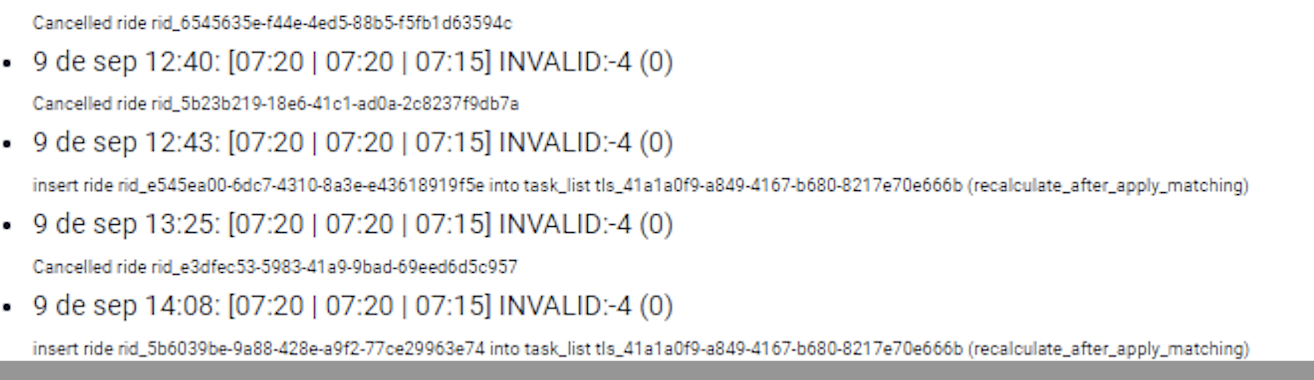
In the matching logs of a ride, what does INVALID:-4 mean?
The issue is that the solution “breaks” due to a collapse in the time window. Specifically, the plan fails because “4 minutes are missing”—this is the meaning of the -4. For everything to work, the “earliest achievable arrival” at the task is calculated to be 7:20. So, if the driver speeds up and everything goes smoothly, they can arrive by 7:20. However, to keep the plan on track, the “latest possible departure” needs to be 7:15, which the driver cannot meet. This is what we call a “broken time window.”
While the difference between 7:20 and 7:15 is indeed 5 minutes, it’s important to note that the system calculates everything down to the second, though the debug output rounds to full minutes for readability. So, visually, due to rounding, the gap is between 4 and 5 minutes.
Small broken windows can still be tolerated up to the configured threshold for time window collapsing. In this case, the gap is too large, so the solution is rejected.
Why weren’t two rides pooled together?
Every case is unique, so we cannot provide a single response to explain all scenarios. Here’s a checklist to troubleshoot why two rides weren’t pooled together.
- Identify which ride was booked first and which was second. Check the timestamps for
User accepted atandDriver accepted at.- Identify the vehicle planning chosen for the first ride.
- Locate this vehicle planning in the matching logs of the ride booked second.
- Identify which fingerprint this would have been at the given time (consider that rides might have been booked or canceled afterward).
- Look for this solution in the logs and investigate why the pooling attempt was unsuccessful.