
Interior configurations
When creating or editing a vehicle, you can define its interior configuration.
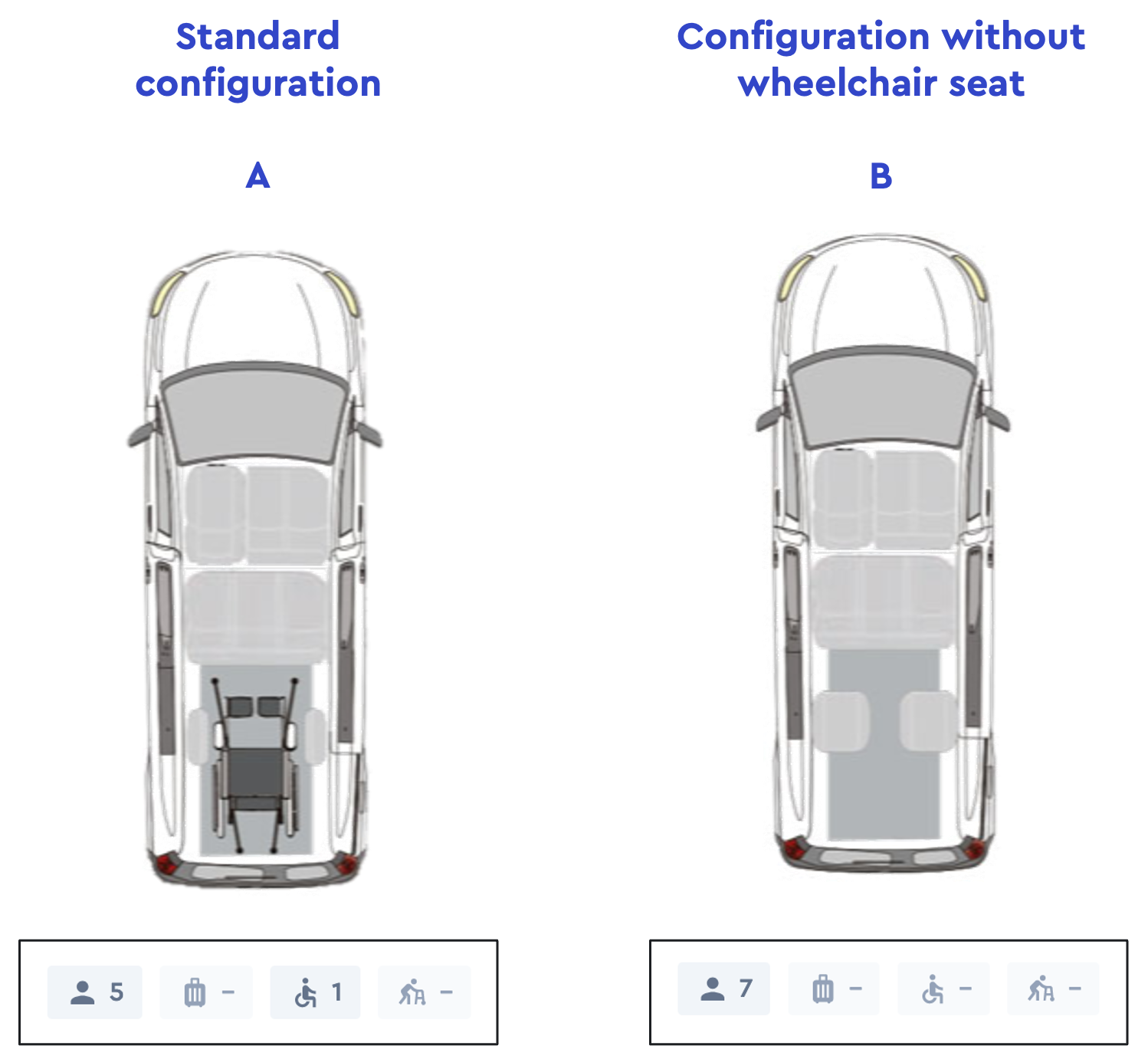
Vehicles can have several interior configurations. This lets the same vehicle support different interior layouts.
When more than one interior configuration exists, ioki Platform checks all saved configurations during matching. A vehicle remains matchable if at least one configuration can cover the requested resources. Capacity checks for an already assigned vehicle also consider all saved configurations against the current occupancy. The default flag does not limit matching to one configuration.
There are 5 prebookings on a vehicle. A booking for a wheelchair seat is done. The vehicle is now fully occupied within the configuration A. As a result, the vehicle will no longer be available for further ride requests. If the wheelchair booking is canceled again, the system releases another 2 seats in configuration B – or offers a wheelchair seat again – depending on which ride request is done first.
View interior configurations
Permissions:
read_vehicles
From the product overview in Control Center, select Vehicles in the left sidebar. To open the interior configurations of a vehicle, select ⚙️ > Interior configurations in the dropdown menu. In this view, you can see all available interior configurations for the selected vehicle.
Create an interior configuration
Permissions:
update_vehicles
To create an interior configuration, select Create new and enter the following information.
- Name (optional):
Seat types
- Seats (default = 0)
- Medical seats (default = 0)
- Special seats (default = 0)
For children
- Child booster seat (default = 0)
- Child safety seat (default = 0)
Medical Aids
- Wheelchair bay (default = 0)
- Wheelchair storage spaces (default = 0)
- Walker bays (default = 0)
- Walker storage spaces (default = 0)
Storage
- Suitcase storage spaces (default = 0)
- Hand luggage storage spaces (default = 0)
- Bicycle racks (default = 0)
- Pet transportation bays (default = 0)
- Storage units (default = 0)
Accessoires
- Power plugs (default = 0)
- WLAN (default = 0)
Arbitrary resources
- Resource 1 (default = 0)
- Resource 2 (default = 0)
- Resource 3 (default = 0)
- Resource 4 (default = 0)
- Resource 5 (default = 0)
Select Save.
Open the detailed view of an interior configuration
Permissions:
read_vehicles
To open the detailed view of an interior configuration, select ⚙️ > Show in the dropdown menu.
Edit an interior configuration
Permissions:
update_vehicles
To edit an interior configuration, select ⚙️ > Edit in the dropdown menu. Make the desired changes and then select Save.
How changes affect existing bookings
Changes to an interior configuration take effect immediately, but they are not applied retroactively to bookings that are already confirmed. ioki Platform always reads the current configuration when it evaluates a vehicle, so the new values apply from the moment you save—for future ride requests and for any later change to an existing ride, but never as an automatic re-check of bookings that are already in place.
After you save:
- Confirmed bookings are not changed. Existing rides assigned to the vehicle are not adjusted, re-validated, or canceled. They keep the resources they were booked with.
- New matching uses the new values. Any ride request handled after the change is matched against the updated configuration. See matching.
- Later changes to an existing ride use the new values. When the resources of an existing ride are re-checked—for example when a passenger is added through passenger update after booking, or when a driver accepts a ride that was matched but not yet accepted—the check runs against the current configuration.
Reducing capacity—such as lowering the number of seats from 4 to 3, or removing a wheelchair bay, walker bay, or storage space—does not cancel bookings that no longer fit. Those rides stay in place, but the next action that re-checks resources, such as adding a passenger or a driver accepting the ride, can be rejected because the vehicle no longer offers enough space. Reduce capacity with care on vehicles that already have bookings, and check the affected vehicle plannings for rides that exceed the new capacity.
Set an interior configuration as the default
Permissions:
update_vehicles
To set an interior configuration as the default, select ⚙️ > Set as default in the dropdown menu. Only one interior configuration can be the default at a time. Setting a new default removes the default flag from the other configurations. The default configuration cannot be deleted.
Delete an interior configuration
Permissions:
update_vehicles
To delete an interior configuration, select ⚙️ > Delete in the dropdown menu and then OK.