
Overview
Roles: Super Admin
The Overview in the Management Area contains sub-views that provide information on providers and products configured in the given environment. There are four sub-views:
These sub-views are represented by the following icons (from left to right).
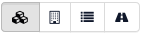
You can filter all sub-views by the product attribute State (planned, live, and ended).
Provider product grouping
This sub-view lists the products belonging to each provider, grouped by provider. Each product row shows its logo, its name with a State badge, and the product attributes Go Live at and Discontinued at.
You can filter by product name, provider name, and the product State.
Provider feature flag
This sub-view lists providers and their activated provider features as a matrix. Each row is a provider, shown with its name and capability badges for the connected external services (Stripe, LogPay, Firebase, and eos.uptrade). Every provider feature has its own column: a cell is highlighted when the feature is enabled for that provider and greyed out when it is not.
You can filter each feature flag (any, enabled, or disabled), as well as by product name, provider name, and the product State.
Product feature flag
This sub-view lists products and their activated product features as a matrix. Each row is a product, shown with its name and a badge for its provider. Every product feature has its own column, highlighted when the feature is enabled and greyed out when it is not.
You can filter each feature flag (any, enabled, or disabled), as well as by product name, provider name, and the product State.
Product routing setup
This sub-view lists products and their routing setup. Each row shows the product name—linking to its routing setup—and its configured routing adapters as colored badges grouped by adapter family (HERE, NextBillion, and OSRM). A separate column is shown for each routing adapter setting, including fare calculation, journey calculation, ride direct routing, task-list recalculation, the table routing adapters (ride inquiry, low-quality and high-quality passes, pedestrian station walk-up), and turn-by-turn navigation.
You can filter by product name, provider name, and the product State.